| Brand: | ebmpapst |
| Part No: | R1G133-AA65-36 |
| Fan Type: | Centrifugal Fan |
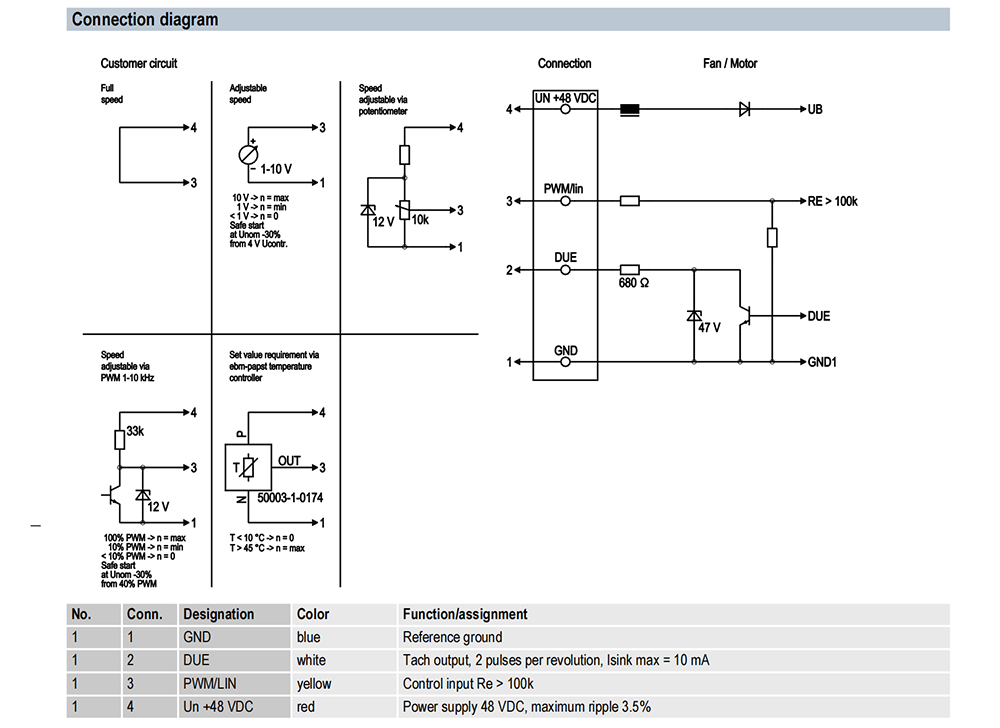
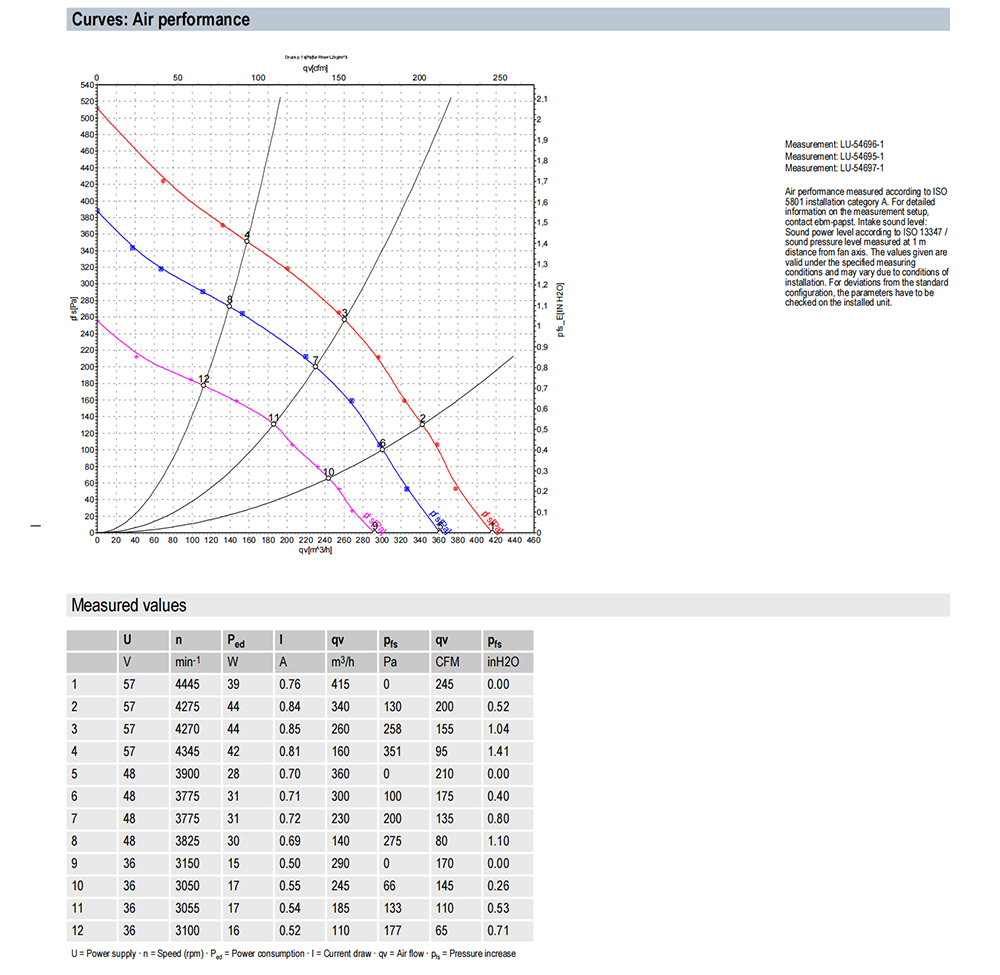
| Rated Voltage(V): | 48 |
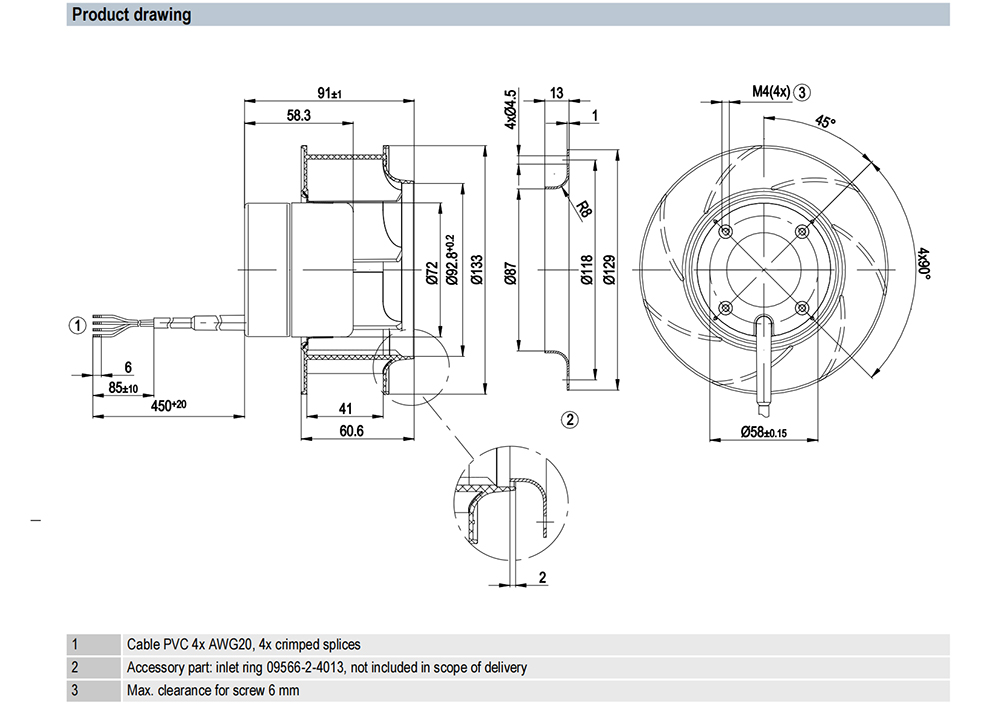
| Size(mm): | 133 |
| Max.Air Flow(m³/h): | 415 |
| Max.Pressure(Pa): | 350 |
| Input Power(W): | 28 |
| Speed(rpm): | 3900 |
| Noise(db): | N/A |


R1G133-AA65-36 Centrifugal Fan Troubleshooting and Installation Points
R1G133-AA65-36 Centrifugal Fan may encounter various faults during actual use, and correct installation is the basis for its normal operation. Below we will introduce the common fault handling methods and installation points of the fan in detail.
Fan does not start
Electrical fault
First check whether the power supply is normal. Use a multimeter to measure the power supply voltage and ensure that its output is a stable 48V. If the power supply has no voltage output, check whether the power switch is on and whether the fuse is blown. If the fuse is blown, replace the fuse of the same specification and find out the cause of the blown fuse, which may be a short circuit, motor overload, etc.
Check whether the terminal is loose or in poor contact. Loose terminal blocks will cause the circuit to be disconnected and the motor cannot get power. You can tighten the terminal blocks with a screwdriver to ensure that the connection is firm. At the same time, check whether the wiring is correct and whether there is a short circuit or open circuit.
Check whether the motor winding is damaged. Use an insulation resistance meter to measure the insulation resistance of the motor winding. If the insulation resistance value is too low, it means that the motor winding may have a short circuit or ground fault. For motor winding failure, professionals are generally required to repair or replace the motor.
Mechanical failure
Check whether the impeller is stuck. The impeller may not rotate due to foreign matter entering, bearing damage, etc. Open the inspection door of the fan, manually turn the impeller, and feel whether there is resistance. If the impeller is stuck, you need to find out the cause of the jam and eliminate it. If there is foreign matter entering, carefully remove the foreign matter; if the bearing is damaged, you need to replace the bearing.
Check whether the transmission parts such as the coupling are damaged or fall off. Although the fan is not belt-driven, damage to other transmission parts will also affect the normal operation of the fan. For the coupling, check whether its connection is firm and whether there is any breakage. If the coupling is damaged, a new coupling needs to be replaced.
Insufficient air volume
Ventilation duct problem
Check whether the ventilation duct is blocked. Dust, debris, fibers, etc. may accumulate in the ventilation duct, resulting in increased ventilation resistance and reduced air volume. The ventilation duct can be cleaned with compressed air or special cleaning tools.
Check whether the ventilation duct is damaged or leaking. A damaged ventilation duct will cause some air to leak, thereby reducing the amount of air reaching the destination. For damaged ventilation ducts, they should be repaired or replaced in time. Sealing strips or sealants can be used to seal the damaged parts of the ventilation duct. For severely damaged parts, the corresponding pipe sections need to be replaced.
Check whether the diameter of the ventilation duct is appropriate. If the diameter is too small, it will limit the flow of air and cause insufficient air volume. When designing and installing ventilation ducts, the diameter should be reasonably selected according to the performance of the fan and the actual ventilation needs.
Impeller problem
Check whether the impeller blades are damaged, deformed or worn. If the blades are damaged or deformed, it will affect the aerodynamic performance of the impeller and cause a decrease in air volume. For damaged blades, the impeller can be repaired or replaced according to the situation. If the blades are only slightly damaged, they can be repaired by welding, grinding, etc.; if the damage is serious, the entire impeller needs to be replaced.
Check whether there is a lot of dirt accumulation on the impeller. Dirt will increase the weight of the impeller and affect its rotation speed and efficiency. Compressed air or detergent can be used to clean the impeller to remove dirt. When cleaning the impeller, be careful to avoid damaging the blade surface to avoid affecting its aerodynamic performance.
Motor speed problem
Check whether the power supply voltage of the motor is stable. Too low voltage will reduce the motor speed, resulting in insufficient fan air volume. You can use a voltmeter to measure the actual power supply voltage of the motor. If the voltage is too low, check whether there is a problem with the power supply line, such as too thin wires, poor contact, etc. For the case of too thin wires, replace the wires of appropriate specifications; for parts with poor contact, re-tighten the terminals or repair the contact points.
Check whether the motor winding is faulty. A short circuit or open circuit in the winding will affect the normal operation of the motor and cause a decrease in speed. For motor winding failures, professionals are required to use professional equipment for detection and repair. At the same time, check whether the motor bearings are damaged. Damaged bearings will increase the running resistance of the motor and cause a decrease in speed. If the bearings are damaged, they should be replaced in time.
Excessive vibration
Impeller imbalance
During the long-term operation of the fan, the impeller may be damaged due to wear, dirt accumulation and other reasons. When the impeller is unbalanced, centrifugal force will be generated during high-speed rotation, causing the fan to vibrate. A professional dynamic balancer can be used to detect and correct the impeller. If there is no dynamic balancer, a simple method can also be used for preliminary judgment. For example, after the fan stops running, gently turn the impeller by hand to feel whether the impeller rotates smoothly. If there is an obvious jam or uneven feeling during rotation, it may indicate that the impeller is unbalanced. For dirt accumulation on the impeller, it can be cleaned; for impellers with severe wear, they need to be repaired or replaced.
Bearing failure
Check whether the bearing is worn, noisy or hot. Worn bearings will cause the center of rotation of the impeller to shift, causing the fan to vibrate. You can judge whether there is a problem with the bearing by listening to the sound. The sound of a normally operating bearing is smooth and uniform. If you hear abnormal friction or noise, it may indicate that the bearing is faulty. Use a thermometer to measure the temperature of the bearing. If the temperature is too high, it may also be a manifestation of bearing failure. Damaged bearings should be replaced in time. When replacing bearings, choose the appropriate model and specification, and install them according to the correct installation method to ensure that the bearings are firmly installed and the matching accuracy with the shaft meets the requirements.
Foundation installation problem
If the foundation of the fan is not firmly installed or the level does not meet the requirements, it will also cause excessive vibration. Check whether the anchor bolts of the fan are tightened and whether the foundation is loose or sinking. If the anchor bolts are loose, tighten them in time; if the foundation is loose or sinking, the foundation needs to be reinforced or readjusted. Use a level to check the level of the fan and ensure that the fan is installed on a horizontal surface. Excessive deviation in levelness may cause additional vibration when the fan is running. If it is found that the level does not meet the requirements, it can be corrected by adjusting the gasket and other methods. In addition, check whether the connection between the fan and the ventilation duct is firm. A loose connection may also cause vibration transmission and amplification. If the connection part is loose, the bolts should be retightened or other reinforcement measures should be taken.
Abnormal noise
Mechanical friction noise
Check whether there is friction between the impeller and the casing. When the impeller rotates at high speed, if the gap with the casing is too small, friction may occur. You can use a feeler gauge or other tools to measure the gap between the impeller and the housing to ensure that the gap is within the specified range. If the gap is too small, you can adjust the position of the impeller or replace related parts. At the same time, check whether the housing is deformed. If the housing is deformed and the gap becomes smaller, it needs to be corrected or replaced.
Check whether the bearing is lacking oil or damaged. A bearing lacking oil will produce a dry friction sound during operation, while a damaged bearing will make a sharp noise. If it is lacking oil, add an appropriate amount of lubricating oil that meets the requirements in time; if the bearing is damaged, a new bearing must be replaced.
R1G133-AA65-36 Centrifugal Fan may encounter various faults during actual use, and correct installation is the basis for its normal operation. Below we will introduce the common fault handling methods and installation points of the fan in detail.
Mar 06.2025The R1G133-AA65-36 centrifugal fan has many significant features and advantages in the field of ventilation equipment, which makes it stand out in the market and can meet the diverse needs of different users. Below we will introduce the features and advantages of this fan in detail.
Mar 06.2025R1G133-AA65-36 centrifugal fans have a wide range of application scenarios in many fields due to their unique performance and characteristics. Below we will introduce in detail their specific applications in different scenarios.
Mar 06.2025R1G133-AA65-36 centrifugal fan needs scientific and reasonable operation and maintenance to ensure its stable performance and extend its service life during long-term operation
Mar 06.2025